How do I send routes to my drivers’ phones without them installing an app?
Updated
Short answer
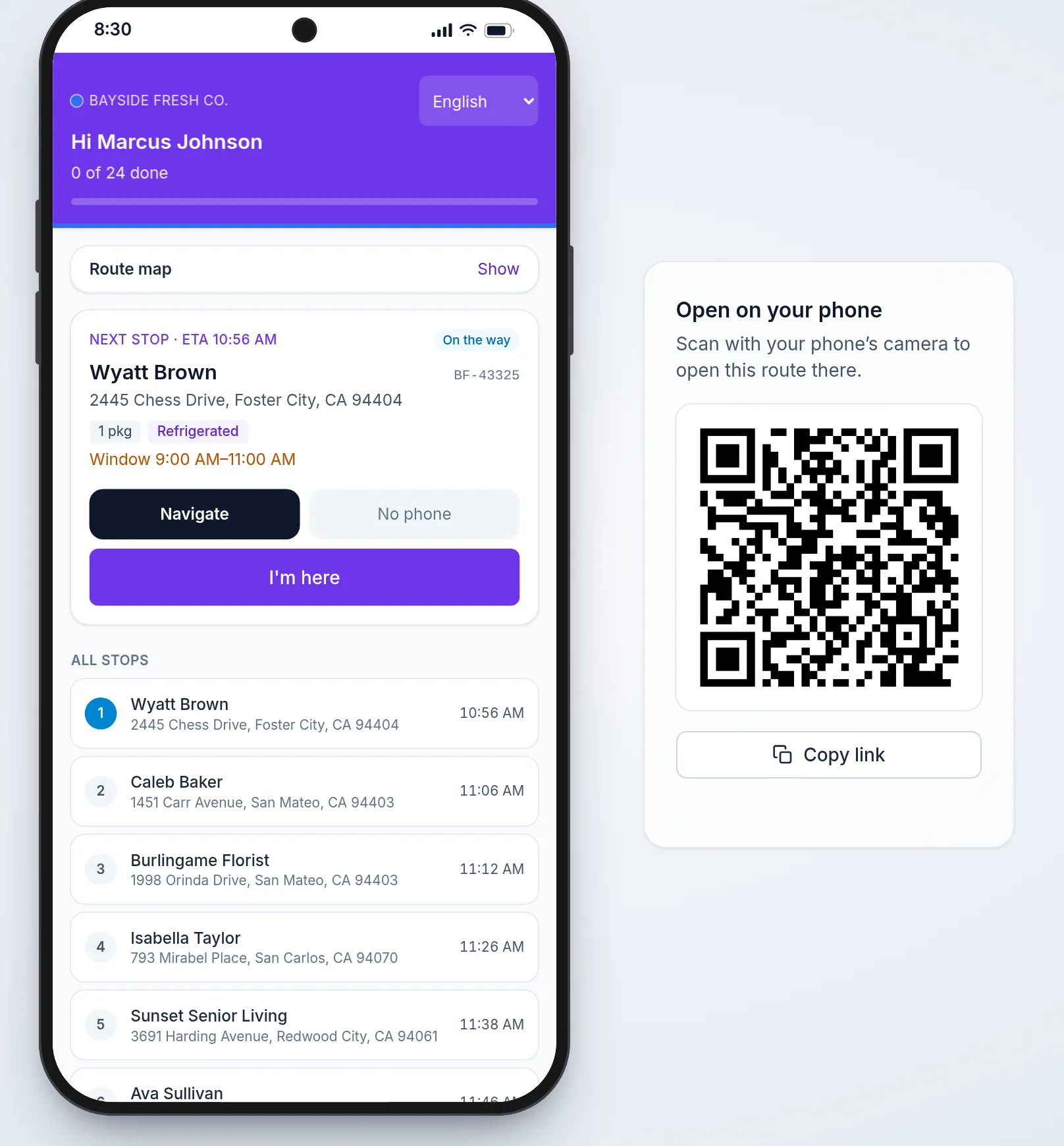
Send each driver a link to their route. In Afi Planner every driver’s route has a link that opens in any phone browser, with no install: the next stop, Navigate, I’m here and Delivered with the photo or signature you require. Send all by SMS texts every driver their link from your own Twilio account, and each driver also has Copy link, SMS, WhatsApp and QR code buttons to send it from your own phone.
Not the right tool if you need the driver’s location while the phone is locked or in another app: the route page shares it only while it is open. The free Afi Driver app for Android and iPhone keeps sharing in the background.
How it works in Afi Planner
Send the link the way your drivers read messages
Afi Planner is route planning and delivery management software for local delivery teams, made by Afi Labs. Plan the day, click Send to drivers, and every driver’s route link is in the Send dialog.
- Send all by SMS: one text per driver from your own Twilio account, such as “Acme: your route for today (12 stops, start 8 AM)” and the link; Send updates texts the changed route
- Without Twilio: the SMS and WhatsApp buttons open the message on your own phone, and an email button opens it in your own mail app
- Copy link, a QR code to scan, and Preview to open the driver’s page yourself
- “Opened” or “Not opened yet” beside each driver, and whether they have seen the last update
What the driver gets in the browser
The page starts with the next stop. Navigate opens Google Maps, Apple Maps or Waze, as the driver chooses. The driver taps I’m here, then Delivered with the photo, signature or recipient you require, or picks one of your failure reasons. With location allowed, the page shares the driver’s position while it is open during the working day, so ETAs stay live.
- Chat with dispatch on the same page: text, photos and voice notes, one thread per driver and day
- Call dispatch in one tap; after hours it dials your after-hours number
- In English, Spanish, Vietnamese or Swedish, set in Settings
No signal, or on a computer
With no signal, the page still opens the route as last saved on the phone and keeps the driver’s reports until the connection is back. Open the same link on a computer and the route shows inside a phone, exactly as the driver sees it, with a QR code beside it to take the route along on a real phone. A driver who chose their own password in the app is asked for it before the link opens.
Try it in the live demo
A fictional delivery company in the middle of its day. Read-only, no sign-up.
Open the live demo →Feature
Driver app
A driver app your team learns in a minute: next stop first, one-tap navigation, photo and signature proof of delivery, barcode scanning and offline support.
5 steps · 4 min read
Sending routes to drivers and following the day live
Frequently asked questions
Does the driver need an account?
No. The link opens the driver’s route in any phone browser. A driver who chose their own password in the Afi Driver app is asked for it before the link opens, with the username filled in.
Do I need Twilio to text the links?
Only for Send all by SMS, which texts every driver from your own Twilio account. Without it, the SMS and WhatsApp buttons open each message on your own phone.
What happens when I change a route after sending it?
Drivers keep the route they have until you click Send updates. Drivers texted through Send all by SMS then get a text with the changed route.
Is there an app too?
Yes. Afi Driver is free on Google Play and the App Store. It adds notifications when a route is ready or changes and shares location in the background. The link page and the app can be mixed in one team.
More answers
Text your drivers today’s routes
Route links that open in any phone browser, with proof of delivery and chat, on a 3-month free trial, no credit card.
Questions about your setup? Talk to sales